- Draw a diagram of your preferred workflow and explain why you take certain steps
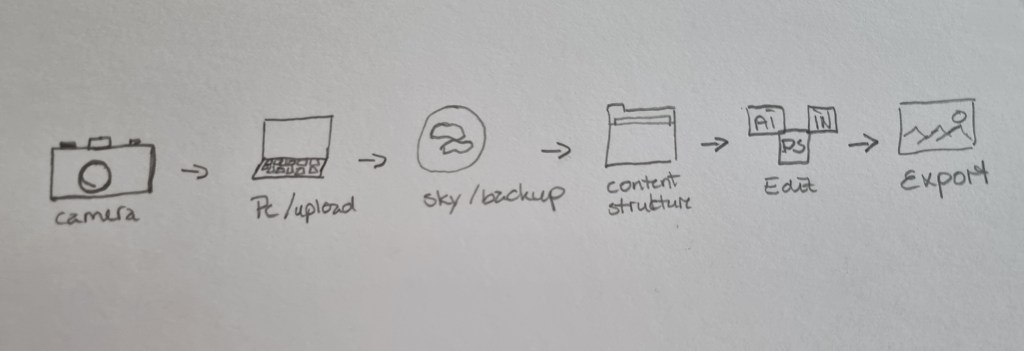
- Taking pictures with my camer
- Upload images from sd card and into my computer
- Upload copies of my pictures in a cload library
- Sturcture my pictures in files and delete the pictures that I dont wont to have
- Edit my pictures in adobe program
- Export the image in the right content for my client.
- Create a checklist for your workflow
- Plan photoshoot
- Charge batteries
- Make the hard drive ready (make sure there is room for the photos)
- Find the required equipment for the photoshoot
- Take photo’s
- Transfer photos to computer
- Upload a photo copy to a cloud library.
- Delete unwanted pictures and sort pictures into files.
- Edit photos in Lightroom or Photoshop
- Send images to client
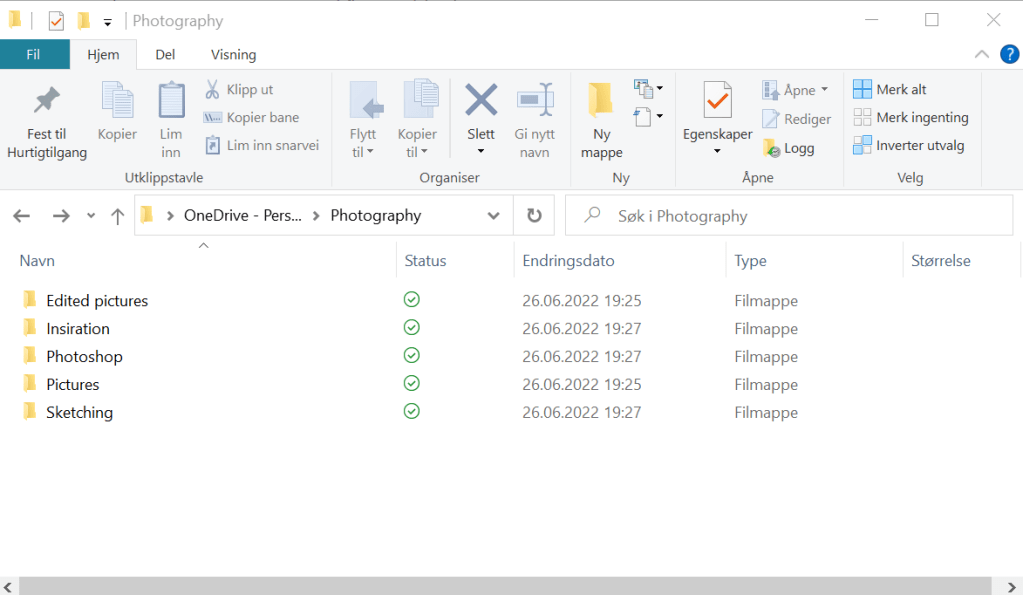
- Take a screenshot of your folder structure
- Explain why creating backups are so important
Creating backups is important because you dont want to loose your content if something bad happens to your computer, like system crashing or your computer get stolen. In many cases the pictures can not be retaken and it is critical to be able to hand in your files to your client. Or when you are in the editing process. If you have a backup of your photographs you can always go back to the original files. This is important if you mess up the image or if you are not happy with the editing result.
 My reflective journal